
TezLab
Brooklyn Running LLCAuto & Vehicles
4.6267.00 Reviews
- Version
- 2026.17
- Installs
- 50.00K
- Age Rating
- Everyone
Screenshots
Our Review of TezLab
 Analysis by Appyee
Ever wondered how efficient your electric vehicle (EV) truly is? Well, buckle up because TezLab might just be the copilot you need. As an EV enthusiast, I recently gave this nifty app a whirl, and boy, did it have some surprises in store. Let's dive into the ins and outs of this app and see if it’s worth a spot on your home screen.
A companion for the daily EV routine
What makes an EV companion useful is not simply showing a battery figure; it is helping you notice patterns that are easy to miss when you only check the car occasionally. I find TezLab most appealing for drivers who like to connect day-to-day vehicle use with longer-term habits. A short commute, a weekend trip, and a charging stop can tell different stories, and putting those details in one place gives an owner more context than a quick glance at the vehicle’s display.
A realistic use is checking the car before leaving for work, then reviewing a trip later when a route or driving style seemed unusually energy-hungry. Rather than treating one journey as a verdict, I would compare similar trips and look for a recurring pattern. That is a more useful way to interpret efficiency than trying to change your driving based on a single number. The app is better suited to curiosity and reflection than to making every drive feel like a test.
Who gets the most from it
I would point data-minded EV owners toward this kind of tool, especially anyone who enjoys looking back at trips instead of relying only on memory. It can also suit a new owner who wants to become more familiar with how everyday driving affects energy use. The social side may appeal to someone who enjoys comparing experiences with other owners, provided that leaderboards feel motivating rather than distracting.
On the other hand, if you only want the simplest possible way to check the car’s current state, the vehicle’s own interface may already be enough. Drivers who dislike notifications, statistics, or community features may not get much value from adding another app to their routine. I would also avoid treating an estimate as a promise: range is a planning aid, not a guarantee that every trip will use energy in the same way.
Getting Started with TezLab
First things first, downloading TezLab is a breeze. It's available for both Android and iOS, and the installation process is straightforward. Once you open the app, it greets you with a clean and intuitive interface. Syncing the app with your Tesla is as simple as logging into your Tesla account. And just like that, you're ready to explore the wonders of TezLab.
Brooklyn Running LLC develops the app, which sits in the auto and vehicles category. It is free to install, with optional in-app purchases, and is rated for Everyone. Its current version is 2026.7, while the app itself dates back to Feb 13, 2017. That combination gives the product a long history and a current release, though a version number alone cannot tell me which features changed or how a particular update behaves. I would judge it by the tools I actually use and by whether they fit my driving routine.
Dashboard: Your EV's Command Center
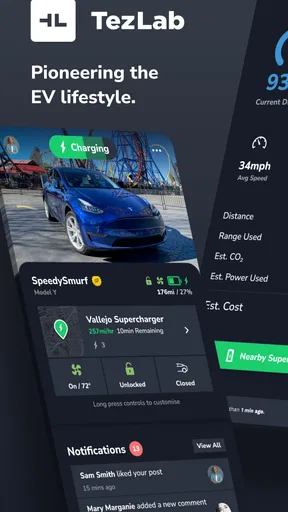
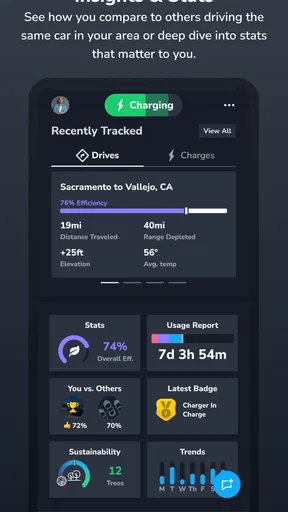
Upon logging in, you land on the dashboard, which feels like stepping into a command center. The app provides a comprehensive overview of your vehicle’s stats. You can see everything from the current battery level to the distance covered. The real-time data gives you a sense of control and understanding over your vehicle’s performance.
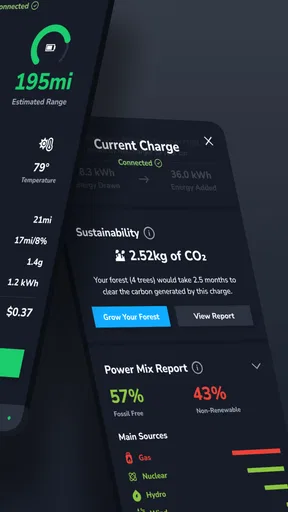
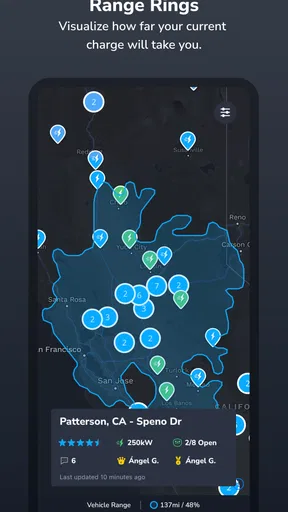
One of the coolest features? The range estimation. It calculates how far you can go based on your driving habits. It’s like having a digital fortune teller for your EV, predicting your range with surprising accuracy. Efficiency metrics give you insights into your driving patterns, helping you optimize energy use. Pretty neat, right?
My practical tip is to use the dashboard as a quick orientation point, not as a reason to keep checking the phone while driving. Before a longer trip, review the displayed state while parked, then use the car’s own driving information as conditions change. Range estimates are most helpful when they inform a decision—such as whether to charge before leaving—not when they invite repeated mid-journey checks.
Community: Connect with Fellow EV Owners
But wait, there’s more! TezLab isn’t just about stats and data; it’s also a community hub. You can connect with other Tesla owners, share experiences, and even compete in driving challenges. The leaderboard feature is a fun way to engage with the community and see how you stack up against other Tesla enthusiasts. It adds a social twist to the whole driving experience.
I see the community tools as optional seasoning rather than the main reason to install it. They may make routine tracking more enjoyable, but comparisons can be misleading if people drive different routes or have different habits. I would use challenges for light engagement, not as a measure of who is the “best” driver. If you prefer private, practical records, the trip and efficiency views are likely more relevant than a leaderboard.
Trip Tracking: Journey Insights
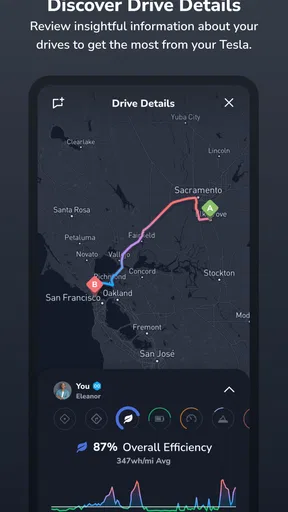
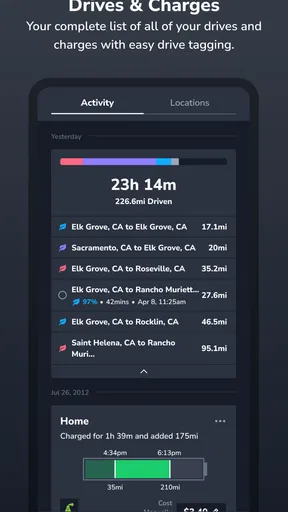
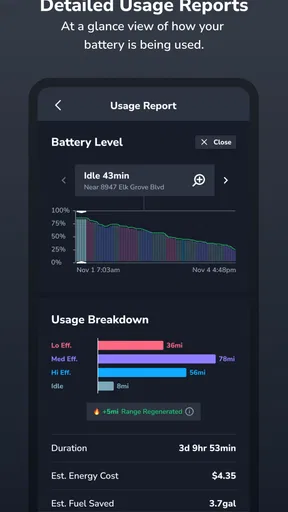
Now, let’s talk about trip tracking. This feature is like having a personal travel diary. Every trip you make gets logged, providing detailed insights into distance, energy consumption, and efficiency. It's perfect for those who love diving into the nitty-gritty details of their journeys. Plus, it’s a handy tool for analyzing your driving habits over time.
A useful workflow is to review trips in batches rather than reacting to each one. For example, after a week of commuting, compare journeys that follow a similar route and consider whether traffic, speed, or other everyday differences might explain a change in consumption. That keeps the app’s records in perspective and helps turn numbers into a practical observation. It is not a substitute for careful route planning, but it can make your own habits easier to understand.
Custom Notifications: Stay Informed
Want to be notified about your car’s charging status? Or perhaps you’d like a heads-up if your car’s left unlocked? TezLab has you covered with its customizable notification settings. You can tailor alerts to suit your preferences, ensuring you’re always in the loop about your vehicle’s status. It’s like having a personal assistant keeping tabs on your EV.
There is a trade-off here: alerts are useful only if they remain relevant. I would start with the notifications that solve a real worry, then adjust if they become noisy. A phone alert can draw attention to a status change, but it does not remove the need to check the car directly when something important requires action. Keeping the settings selective makes the app feel more like a helpful companion and less like another source of interruptions.
How it fits beside the usual alternatives
Compared with relying solely on the car’s built-in displays, TezLab’s appeal is the chance to look across trips and engage with a wider owner community. The vehicle interface is usually the natural place for information needed in the moment; an app like this is more interesting when you want to reflect after parking. A general trip log or spreadsheet could also record journeys, but it would take effort to maintain and would not offer the same EV-oriented view described here. The choice depends on whether you value convenient ongoing insight or prefer to keep your setup minimal.
There is also a sensible boundary to keep in mind: I would not make a purchase decision based only on the free download or assume every useful feature is included without charge. Optional purchases range from $6.99 to $59.99 per item, so anyone considering paid extras should check what each one offers and whether it addresses a specific need. The app has a 4.6 average from around 3.9K ratings, with 50K+ installs; those figures suggest an established audience, but they cannot tell you whether its particular mix of tracking and community suits you.
TezLab's Impact on Your EV Experience
So, how does all this impact your overall EV experience? Well, for starters, it enhances your awareness and understanding of your vehicle’s performance. You gain insights that can help you drive more efficiently, which is a win-win for both your pocket and the environment.
The community aspect adds a fun, social layer to owning a Tesla, turning what could be a solitary experience into a shared journey. Whether you’re a data geek, a social butterfly, or both, TezLab offers something for everyone.
And let’s not forget the peace of mind that comes with being informed. The app keeps you connected to your vehicle, ensuring you’re always aware of its status and needs.
That connection is most valuable when it reduces uncertainty without becoming a requirement for every small decision. If you share access to a car or prefer not to add another connected service to your routine, think through whether the extra visibility is worth it for you. A companion app should make ownership clearer, not create pressure to monitor constantly. I would treat it as an optional layer alongside the vehicle’s own controls, rather than the only place to check important information.
Final Thoughts
In the grand scheme of things, TezLab is more than just another app; it’s a lifestyle enhancer for Tesla owners. Whether you’re an efficiency enthusiast, a data-driven driver, or someone who simply wants to be more connected to their vehicle, TezLab delivers on all fronts.
Sure, there might be a learning curve for some features, but once you get the hang of it, you’ll wonder how you ever managed without it. So, if you’re ready to take your Tesla experience to the next level, give TezLab a try. Happy driving!
My recommendation is measured: try it if you enjoy reviewing driving patterns and want an EV-focused companion, but skip it if the car’s built-in information already answers your questions. The product has continued to receive versions, including 2026.7, yet future changes should be judged when they arrive rather than assumed from the version label. I would watch for improvements that make trip history easier to interpret and notifications easier to tailor, while keeping expectations grounded in the features available now.
Verdict
Strengths of TezLab
- User-friendly interface for easy navigation.
- Real-time data for efficient EV management.
- Customizable notifications for better alerts.
- Detailed trip history with energy insights.
- Community features for EV enthusiasts.
Limitations of TezLab
- Limited functionality for non-Tesla vehicles.
- Requires constant app updates for accuracy.
- Occasional connectivity issues reported.
- Some features behind a paywall.
- Battery usage can be high with constant use.
Similar Picks in This Category
View All
Android Auto
Google LLC4.1

maxim — order a taxi & food
PT. SITO4.7

Штрафы ГИБДД: проверка с фото
Pays LLC – Штрафы ГИБДД4.7

Номерограм – проверка авто
Авто Ассист4.8

Дром Авто
Дром4.9

Frequently Asked Questions
What is TezLab and what does it do?
TezLab is a companion app designed for Tesla owners, providing detailed insights into vehicle performance, battery health, and driving efficiency. It tracks your trips, offers real-time data, and connects you with other Tesla enthusiasts. Whether you're interested in stats or social features, TezLab enhances your Tesla ownership experience.
Is TezLab compatible with all Tesla models?
Yes, TezLab is compatible with all Tesla models, including the Model S, Model 3, Model X, and Model Y. The app integrates seamlessly and provides specific data tailored to each model, ensuring that you receive relevant information regardless of which Tesla you drive.
How secure is my data on TezLab?
TezLab prioritizes user privacy and data security. The app uses encryption to protect your data and does not store sensitive information on its servers. All communication between your Tesla and TezLab is secured, ensuring that your information remains confidential and safe from unauthorized access.
Does TezLab offer a free version, and what features are included?
TezLab offers a free version with essential features such as trip tracking, basic vehicle stats, and community interaction. For more advanced features like detailed analytics and custom notifications, users can opt for the Pro version, which requires a subscription. This tiered approach allows users to choose the level of insight they prefer.
Can TezLab affect my Tesla's warranty or performance?
Using TezLab will not affect your Tesla's warranty or performance. The app functions as a third-party companion that reads data without modifying any vehicle settings. It is designed to work alongside Tesla's systems, ensuring that your warranty remains intact and your car performs optimally.
